Microsoft Teams lets you use Snapchat filters in video meetings, here is how
India Today
Microsoft Teams had separately also rolled out a video filter feature, through which users can choose the filter of their choice and adjust lighting levels and customise their appearance before a meeting starts.
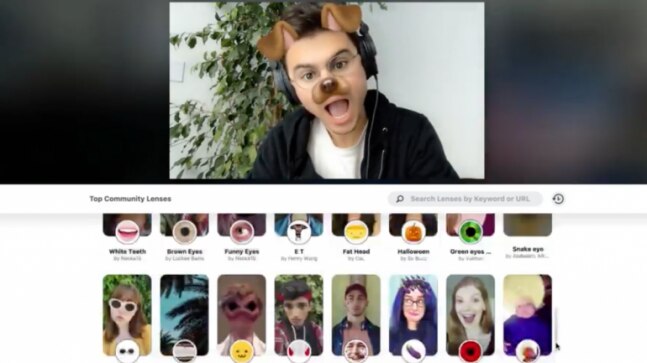
When it comes to Microsoft Teams video meets, you can’t run but you can hide. Yes, closing your camera is one option but you can’t always get away with that. However, using a gazillion Snapchat filters that are now available for desktop, might just do the trick. You just have to make sure it is appropriate for you to appear on your video meetings in one of those avatars. Microsoft Teams and Zoom have their own wide array of filters. Microsoft Teams also separately rolled out a video filter feature, through which users can choose the filter of their choice and adjust lighting levels and customise their appearance before a meeting starts. However, adding filters through Snap Camera gives users more filter options, and the camera lens works for other video conferencing apps like Zoom too. Users are essentially collaborating on two software while using Snapchat filters on Microsoft Teams or Zoom. Snap Camera, currently available for macOS and Windows 10 has a range of filters and effects that will be available to you on your Desktop. You can be a floating potato, someone with a horned headdress, or the infamous but adorable white kitten. Follow the given steps to use a Snapchat filter in one of your Teams meetings: -- Log on to https://snapcamera.snapchat.com/

Oppo is gearing up to launch its next camera flagship — the Find X9 Ultra — in April. The device will support a teleconverter paired with Hasselblad optics.

Anthropic is testing a new "Phone Use" feature for Claude AI that could allow the assistant to make calls, send messages, and perform tasks on your smartphone while also controlling apps on your computer.

The Delhi government announced a major push for education in its 2026–27 Budget allocating Rs 19,148 to the sector. From infrastructure upgrades to student incentives, the plan aims to expand access and modernise learning.

Meta has hired the team behind the agentic AI startup Dreamer. The startup was founded by former Google executives Hugo Barra, David Singleton, and Nicholas Jitkoff, who will now work on Meta's agentic AI plans. This announcement comes after Mark Zuckerberg acquired the AI social media platform Moltbook to bolster agentic AI development.

OpenAI is offering big incentives to private equity firms in a bid to raise more funds. The ChatGPT-maker is offering a minimum return rate of 17.5 per cent, as well as early access to its new AI models. As per reports, the Sam Altman-led firm is hoping to secure a stronger footing in the enterprise market following Anthropic's lead.

The Centre said UPSC will release provisional answer keys shortly after prelims from 2026. The move follows a Supreme Court judgement and aims to improve transparency.

Claude can now control computer like a human, Anthropic says soon you won't need your laptop anymore
Claude can now get full access to your computer, do tasks by itself Anthropic has launched a new feature for Claude that allows the AI to get complete access to your computer. The AI can then complete tasks on your behalf while you are away. This feature comes just days after the company launched "Dispatch" which allows you to control Claude via your phone.


Rajkummar Rao and Wamiqa Gabbi's 'Bhool Chuk Maaf' will premiere on Prime Video on June 6, just two weeks after its theatrical release. Originally planned for a direct OTT debut, the film hit cinemas on May 23.

Fresh spy shots suggest the Mahindra Thar 3-door is set for another update, with design cues inspired by the Mahindra Thar Roxx and a more premium positioning in sight.

Samsung has been teasing its upcoming A-series devices since last week, without officially revealing their names. While speculation has largely pointed to the Galaxy A37 and A57, a lengthy video recently surfaced ahead of any official confirmation, revealing the key specs and pricing of the devices.

Sony will hand over most of its TV manufacturing to TCL in a deal likely worth Rs 8,300 crore, but the Bravia brand will live on. Consumers can expect familiar quality, even if the production behind the scenes changes. Here is everything you need to know.

Noble's first 100 days with the Neuralink N1 implant provide valuable insights into the future of mind-controlled devices. Neuralink is owned by Elon Musk.